


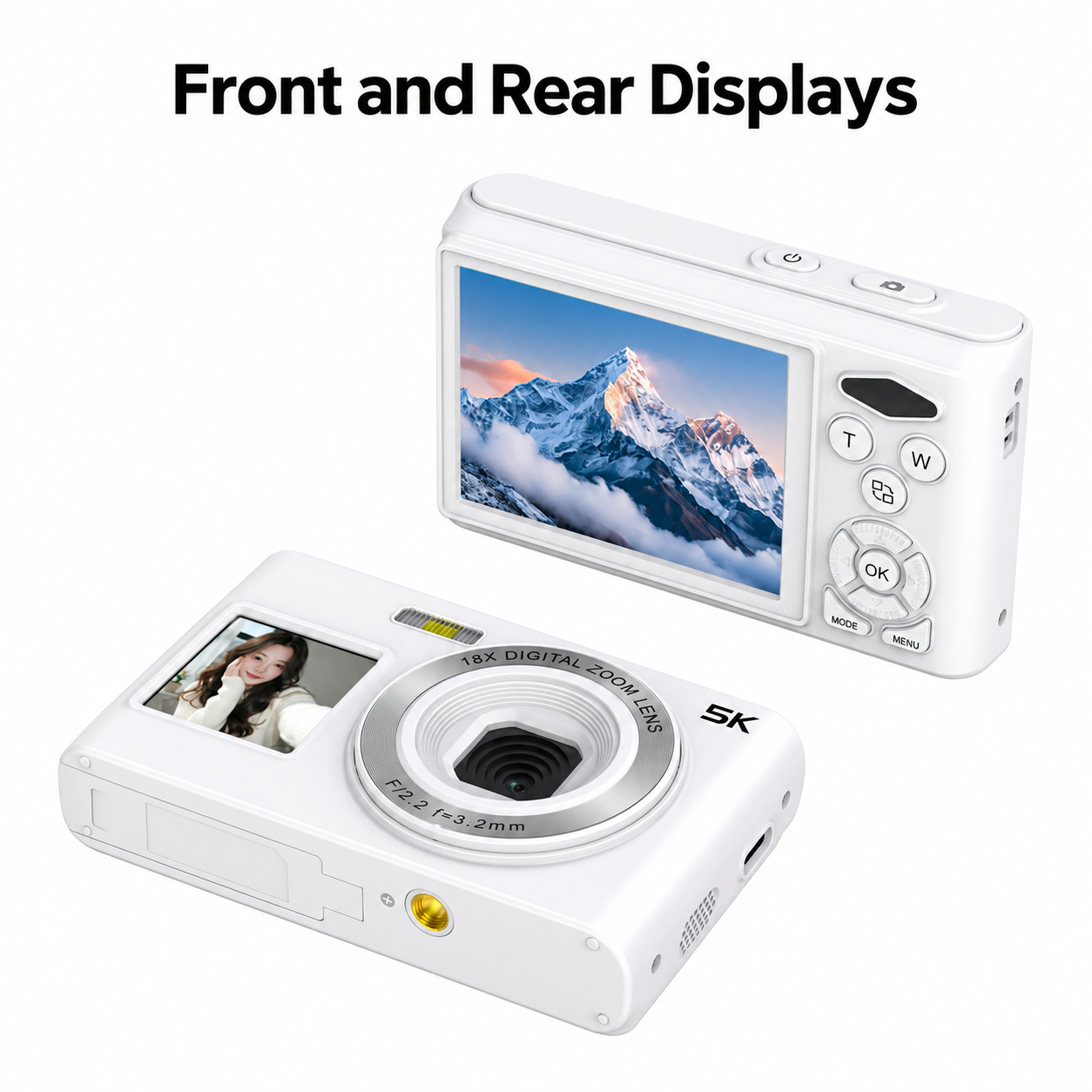
The C6S front screen lets you check selfie framing while the rear screen supports regular photography and playback. Follow the steps below to switch displays, focus, choose shooting modes and transfer files; consult the technical table for the full specification.
Install the Battery and Card
Switch off before opening the battery cover. Install the supplied battery with the correct polarity and remove its insulating sheet if fitted. Insert a TF / microSD card up to 256GB until it clicks. Use Class10 or higher. Back up existing files, then format the card in the camera through Menu, System Settings and Format before first use.
Charge and Power On
Use the Type-C cable with a 5V/1A to 5V/2A USB adapter. Switch off for faster full charging. The red indicator flashes while charging and stays on when full. Short-press Power for normal startup and hold it to switch off; hold Power for the first startup after battery installation. If charging is slow below 10°C, move the camera to a suitable indoor environment.

Switch Displays and Focus
Press the dedicated screen-switch button to change between the rear display and front selfie display. Frame the image, half-press the shutter to focus, then press fully to capture. T and W control 18× digital zoom. Select Auto Focus, Fixed Focus or Manual Focus in settings as needed. The Up/Flash shortcut selects Off, Auto or On; Right provides the filter shortcut.
Choose a Photo Mode
Press MODE to select Photo or Photo Timer. Choose 48MP photo output for interpolated high-resolution output; outputs above the 8MP sensor resolution are interpolated. The timer offers 3, 5, 10 or 20 seconds, while automatic interval photos offer 3, 10, 15, 20 or 30 seconds. The continuous-photo menu offers 3P/S and 5P/S. Smile detection and photo quality can be adjusted in the photo menu.
Video, EIS and Slow Motion
Select Record mode, press Shutter to start and press again to stop. Video settings include 5K, 4K, 2K, 1080P and 720P. Enable or disable EIS and recording sound in the video menu. Time-lapse intervals range from 0.5 to 60 seconds. Slow Motion offers 1080P 2× or 720P 4×. Loop recording offers 1, 2, 3, 5 or 10-minute options, or Off.
Review and Transfer to a Computer
Select Playback and use Up/Down to browse photos or videos; press OK to play a video. Connect Type-C to a computer and choose Charging Mode for powered camera use, Storage Mode to copy card files, or PC Camera for compatible webcam software. Only the digital zoom control is available on the camera in PC Camera mode. Keep the cable connected during file transfer.

Transfer Files to a Phone
Switch off and remove the memory card from the camera. Insert it in a compatible OTG card reader, connect the reader to a supported phone and import the files using the phone file or photo application. Check the reader connector and phone compatibility. Confirm any required reader separately when selecting accessories.
Care and Troubleshooting
For no power, check charge, battery polarity and the insulating sheet. If charging does not start, reseat the battery and check the cable and adapter. For an unrecognized card, check TF format, capacity and insertion; back up files before formatting. If the camera freezes, stop rapid button presses, remove the battery and restart. Clean the lens and screens with a soft lens cloth and protect the camera from moisture and impact.
Technical Specifications
| Model | C6S |
|---|---|
| Image sensor | 8MP CMOS |
| Displays | 2.8-inch rear display and 1.4-inch front selfie display; dedicated screen-switch button |
| Digital zoom | 18×; no optical zoom |
| Lens | F2.2; focal length 3.2mm |
| Photo output | 48MP photo output (interpolated); selectable photo sizes: 80M / 64M / 56M / 48M / 44M / 30M / 24M / 20M / 16M / 12M / 10M / 8M / 5M / 3M. Values above 8MP are interpolated |
| Video resolution options | 5K / 4K / 2K / 1080P / 720P |
| Electronic image stabilization | On / Off in video settings |
| Slow motion | 1080P 2× / 720P 4× |
| Time-lapse video interval | Off / 0.5s / 1s / 2s / 5s / 10s / 30s / 60s |
| Loop recording | Off / 1 / 2 / 3 / 5 / 10 minutes |
| Recording sound | On / Off |
| Self-timer | Off / 3 / 5 / 10 / 20 seconds |
| Automatic interval photo | Off / 3 / 10 / 15 / 20 / 30 seconds |
| Continuous photo menu | Off / 3P/S / 5P/S |
| Photo quality / smile detection | General / Good / Very Good; smile detection On / Off |
| Focus settings | Auto Focus / Fixed Focus / Manual Focus; half-press shutter to focus |
| Flash / fill light | Built-in photo flash and video fill light; flash shortcut Off / Auto / On |
| Exposure compensation | −3 / −2 / −1 / 0 / +1 / +2 / +3 |
| White balance | Auto / Sunny / Cloudy / Incandescent / Fluorescent |
| ISO | Auto / 100 / 200 / 400 / 800 / 1600 |
| Metering | Average / Center / Spot / Matrix |
| Filters | Normal / Black and White / Negative Film / Lomo / Dog Eye / High Saturation / Red / Green / Blue / Retro |
| Storage | TF / microSD card up to 256GB; Class10 or higher recommended |
| Battery / charging | Removable rechargeable lithium battery; Type-C charging with 5V/1A to 5V/2A USB adapter |
| Charging / work indicators | Red flashes while charging and stays on when full; blue work indicator stays on after power-on |
| USB computer modes | Charging Mode / Storage Mode / PC Camera; recording supported in Charging Mode; only digital zoom operates on camera in PC Camera mode |
| Phone file transfer | Via compatible OTG card reader and phone; remove card from camera and insert in reader |
| Width / height | 98.2 × 61mm; body width and height |
| Weight / housing material | Approximately 150g; PC + ABS |
| Screen saver / shutdown | Screen saver: Off / 30s / 1min / 2min; automatic shutdown: Off / 1min / 3min / 5min |
| Display / sound / frequency | Image rotation, LED indicator, icons and time watermark On / Off; volume High / Middle / Low / Off; startup music On / Off; frequency Auto / 50Hz / 60Hz |
| Menu languages | Simplified Chinese / Traditional Chinese / English / Japanese / Korean / Russian / German / French / Italian / Spanish / Polish / Dutch / Portuguese / Turkish / Swedish / Romanian |
| Operating / system modes | Photo / Record / Time-lapse / Slow Motion / Photo Timer / Playback; date/time, format, device version and factory reset |
| Handling | Keep away from rain, moisture and liquids; tripod mount and strap hole provided |
Related Product
View the C6S Dual-Screen Digital Camera for Selfie Framing for product features and configuration enquiries.
